Posts

Migrating from Windows to Mac

If you have decided to migrate from Windows to Mac, you will find that there are a few confusing differences. I note the ones that I can think of, below: 1. There are ALTERNATIVE packages to microsoft office installed, namely Apple Pages, Apple Numbers, and Apple Keynote . These replace Word, Excel and Powerpoint, and if you use them you can use the " save as " command to create a word, excel or powerpoint document. This means you do not need to actually buy MS Office, these work just fine. 2. I recommend AVG antivirus be installed . This is mostly so that if you accidentally go onto a bad website with bad software on it, or a fake website, e.g. a "phishing" site, which is trying to trick you into giving your banking credentials, it will warn you. There are almost no viruses or malware for the machine. HOWEVER , there is ONE piece of malware which pretends to be good software, available, and it calls itself MacKeeper. Do NOT install it. AVG complains a lot on W...
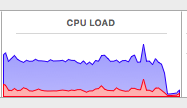
soagent, calendaragent, accountsd and callservicesd hogging the CPU

Image
If your Mac is running hot it might be the addressbook and calendar syncing services. This usually happens when Google or Apple aren't responding or aren't accepting the authentication for cloud sync. The easiest thing to do is turn them off under "Internet Accounts" under System Preferences. However, if you want the details to sync between iCloud and Google to your Mac, you have to rebuild these things or re-authenticate. If that is too much of a pain you can use the UNIX command line to pause them. You can verify this by sorting by CPU usage load in the Activity Monitor as follows. The illustration below shows the CPU load drop when you pause these programs. Above, you see the CPU load sitting at around 86% until I run the script. You can either put this script into Crontab or the /etc/rc file or just do a manual run. Please note that if you run this script it will pause synchronising contacts and addressbook, as well as the icloud system preference/control panel, a...

Mail says it can't find the mail folder even though the path is right

 Sometimes you might get an error saying it can't find the Library/Mail folder which is at /VolumeName/Users/Yourname/Library/Mail And you will notice that if you go into that folder (Library), you do indeed see a folder there called Mail. So In short it's lying. To fix this, just type the following into Terminal (where " yourname " is your login name): rm -rf /Users/yourname/Library/Mail/Containers/com.apple.mail*

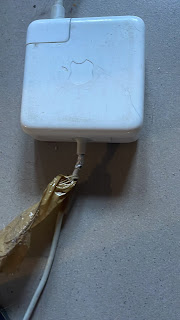
Apple Power Supply fraying

Image
It's well-known that all apple power supplies and cables for the last 10 or more years fray and break after a few years of folding. This post shows you a simple way to fix them rather than buy a new power supply. 1. Trim off the excess plastic around the frayed cable 2. Join the frayed wires again with either new wire or tin foil 3. Take a straw; cut off a piece about 5cm, and cut it lengthwise. 4. Fill it with silicone sealant. 5. Open it and clip it around the frayed section. 6. Let it set before using it, e.g. for a day.

script to copy a folder structure and omit files

 The following script will copy a directory structure from a source to a target and omit files, copying only folders (directories) #!/bin/sh if [ -z "$1" ] ; then echo "Please give a source dir" echo "otherwise I will assume that the source is ".`pwd` echo "Synax: cp-dirsonly.sh sourcedir/ targetdir/" sourcedir="./" fi if [ ! -z "$1" ] ; then sourcedir=$1 fi if [ -z "$2" ] ; then echo "Please give give a target dir" exit fi find $sourcedir -type d -links 2 -exec mkdir -p "$2/{}" \;

recoving files from a mac disk and w o n d e r s h a r e is unethical

Image
If you search for cgsecurity.org testdisk, which is a free opensource utility to recover data from a disk, you get SEO'ed to w o n d e r s h a r e 's website. Whilst w o n d e r s h a r e  does make good software, I think this is entirely unethical. Hence I decided to make this blogpost to help others avoid paying them when free software exists and they are being predators trying to hide this fact by SEO'ing free software to their commercial site. Let me explain how unethical this is. It is like if you google for "wikipedia" and it opens encyclopedia britannica as the first thing and offers you a subscription only option to read the contents. So, if you have lost files on a disk, try cgsecurity.org first. https://www.tecmint.com/photorec-recover-deleted-lost-files-in-linux/ These instructions work for mac except you type the following into the Terminal brew install testdisk and then sudo photorec /dev/disk6 or whatever the drive number is of the drive. In my cas...

Apple Mail does not search

 Apple mail searches using "Envelope Index" database files. These are located in  ~/Library/Mail/V#/MailData where # is some number. 1. Quit mail 2. In the Terminal, just type: find ~/Library/Mail/V?/MailData -name "Envelope Index*" -delete 3. Re-open mail. It should re-index.